Animations Color grading The tool Pricing Version française Get the pack
CapCut pack · 2026 edition

Your video has the content.
It's missing the packaging.

42 text animations, including 12 TikTok caption styles, and 38 professional color grades, ready to install in CapCut. No tutorial to follow, no software to buy: you open it, you type your text, it's animated.

42text animations
12TikTok caption styles
10fonts included
38.cube color grades
120video overlays
2 minto install everything

The problem is almost never the content

A video that doesn't hold people isn't always a topic problem. It's usually flat text, dull colour, packaging that reads as amateur. The three seconds that decide whether someone stays are visual.

The text doesn't move

CapCut's built-in animations are recognisable at a glance. Everyone uses the same three.

The image has no character

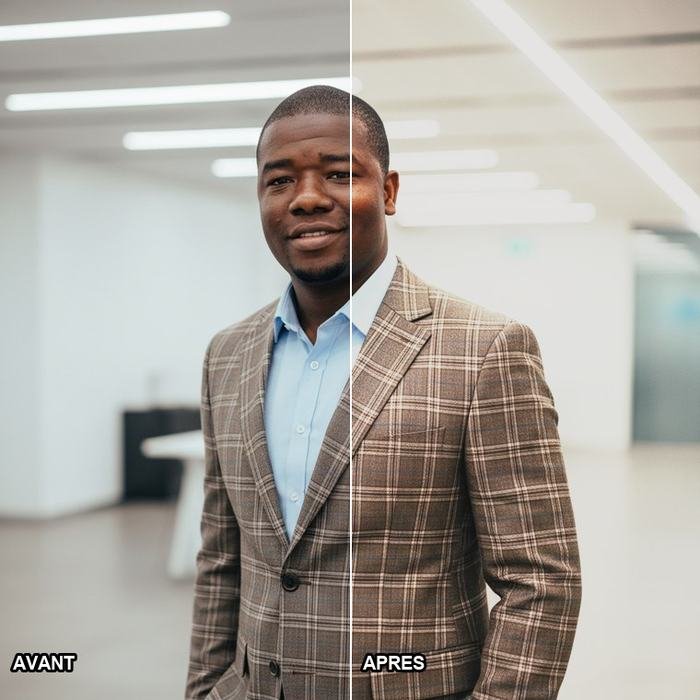
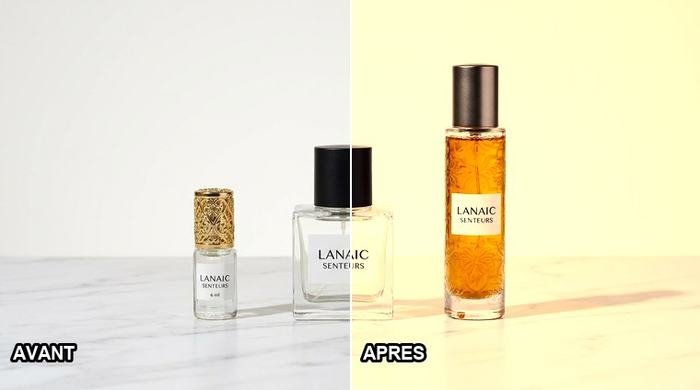
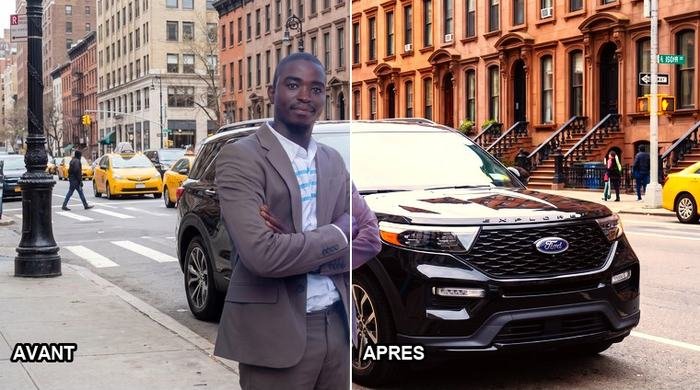
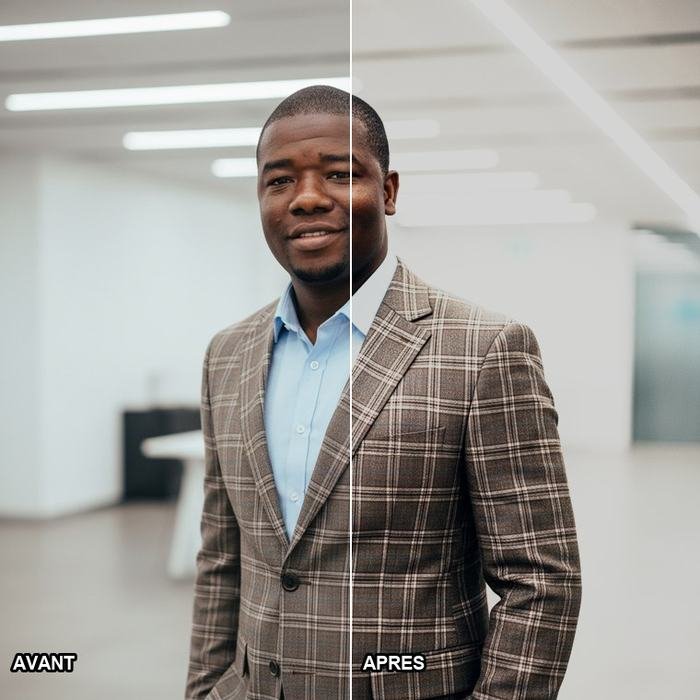
Without grading, a good shot stays flat. With it, it becomes an image.

Faces come out wrong

Most packs turn deep skin tones grey. An entire family here was built to stop that.

It eats your time

Redoing the same settings on every video is time that never goes into the content.

42 text animations

At the top, the 12 caption styles trending right now on TikTok and Shorts: word-by-word highlight, karaoke bar, sticker, neon, chrome. Each one comes with a settings card so you can apply it to your own auto-captions. The 10 fonts they use are included and install in one click — they then show up in CapCut's own font list.
Below, 30 motions shipped as editable CapCut projects and as ready-to-drop video.

01. Hormozi Jaune ★ TRENDING
The most used caption style right now. Any talking video.
02. Hormozi Vert ★ TRENDING
Outdoor shots, skin, wood, sand.
03. Karaoké Surligné ★ TRENDING
Teaching, explainers, tutorials.
04. Sticker Blanc ★ TRENDING
Quiet content, lifestyle, brand, testimonials.
05. Mot par Mot Géant ★ TRENDING
First three seconds, punchlines, countdowns.
06. Néon Cyan
Night, gaming, music, tech.
07. Chrome
Sport, cars, men's luxury, trailers.
08. Or Massif
Money, business, motivation, luxury.
09. Dégradé Rose-Violet
Beauty, fashion, lifestyle.
10. Contour Vide
Credits, branding, elegant intros.
11. 3D Extrudé
Gaming, announcements, younger audiences.
12. Glitch RVB
Tech, AI, cybersecurity, sound transitions.
01. Pop In
Keyword punch-ins, sentence emphasis, quick labels.
02. Scale Pop ★ YOUTUBE
The YouTube workhorse. Highlighting a word while you talk.
03. Fade Up
Clean subtitles, quotes, credits, calm content.
04. Fade Down
Chapter titles, section openers, episode numbers.
05. Slide Left
Tutorial steps, lists, moving between two ideas.
06. Slide Right
Next step, comparison, contrasting two ideas.
07. Slide Up
Subtitles, secondary info, lower third of frame.
08. Slide Down
Warnings, key numbers, things people must not miss.
09. Typewriter
Intros, slow reveals, documentary tone.
10. Word by Word ★ YOUTUBE
Riding a line of narration. The most used effect on YouTube.
11. Character by Character
Brand names, credits, short punchy words.
12. Kinetic Typography ★ YOUTUBE
The strong part of a speech, a punchline, a call to action.
13. Bounce Text
Humour, younger audiences, price reveals, giveaways.
14. Overshoot ★ YOUTUBE
Subscriber counts, results, loud announcements.
15. Elastic Text
Fun content, reactions, lifestyle channels, vlogs.
16. Tracking Reveal ★ YOUTUBE
Credits, branding, premium openers, fashion.
17. Blur Reveal ★ YOUTUBE
Technical terms, concepts, opening a serious topic.
18. Mask Reveal ★ YOUTUBE
Section titles, solemn announcements, documentary.
19. Wipe Reveal
Moving between two parts, section subtitles.
20. Stretch Text
Sport, speed, energy, hard transitions.
21. Rotation In
Logos, signatures, end cards, stamps.
22. 3D Flip ★ YOUTUBE
Documentary feel, change of perspective, reveals.
23. Per-Character 3D
Polished credits, channel intros, brand packaging.
24. Glitch Text ★ YOUTUBE
Tech, AI, cybersecurity, gaming, sound transitions.
25. Flicker Text
Urgency, alerts, night scenes, horror.
26. Shake Text
Impact, shock, a punch in the audio, sport.
27. Random Characters
Decryption, hacking, AI, technology reveals.
28. Highlight Sweep ★ YOUTUBE
Marking one precise word while you speak.
29. Underline Draw
Key points, definitions, list items, teaching.
30. Text Exit / Swipe Out
End of a sequence, fast cuts, edit transitions.

38 professional color grades

.cube files CapCut imports natively on desktop, and for each one a settings card you copy on your phone. Eight families, including one built specifically for deep skin tones.

Blockbuster
Blockbuster Cinematic
Kodak 2383
Kodak 2383 Film stock
Ébène Glow
Ébène Glow Melanin — deep skin tones
Sunset Doré
Sunset Doré Social
Afro Chaud
Afro Chaud Urban / Music video
Récup Ombres
Récup Ombres Correction
4

Melanin — deep skin tones

6

Cinematic

6

Film stock

5

Social

5

Urban / Music video

4

Corporate / Doc

3

Black & white

5

Correction

Included from PRO · Windows and Mac

Clean Cut — the tool that removes dead air

You're editing an interview. You hunt for the silences, you cut, you close the gap. Again. And again. Clean Cut reads your CapCut project, finds the dead air and removes it — everything closes up by itself: video, audio, text and adjustments stay in sync.

0.4 s

To analyse 2 minutes

Near-instant, even on a long interview.

−8%

Shorter on average

On a real interview: 2:20 down to 2:09, without losing a word of what was said.

1 click

To undo everything

Every pass writes a backup. Nothing is ever irreversible.

+

Cut on the beat

Finds the beats in your music and lays the cuts on them.

Windows and Mac. It comes as a macOS app and as a browser version (Chrome or Edge) with nothing to install. It never touches your video files — it only edits CapCut's project file, and writes a backup before every pass.

Try Clean Cut now

Pick your level

One payment, no subscription. Commercial licence in all three.

To get going
STARTER
$19
one-time
  • 42 text animations, including 12 TikTok caption styles
  • The same as transparent and black-background video
  • Vertical and horizontal formats
  • 38 .cube color grades
  • 38 settings cards for mobile
  • 10 installable fonts, commercial licence
  • Illustrated guide, Mac & Windows installers
  • Clean Cut — the dead-air remover
  • Lifetime updates
  • Multi-seat licence
Order
Most chosen
Best value
PRO
$39
one-time
  • Everything in Starter
  • Clean Cut — remove dead air (Windows and Mac)
  • Cut on the beat for music videos
  • Lifetime updates
  • New animations added at no extra cost
  • Answer within 24 h on WhatsApp
  • Multi-seat licence
  • Onboarding session
  • Custom color grade
Order
For teams
STUDIO
$79
one-time
  • Everything in Pro
  • Licence for 3 editing seats
  • One-hour onboarding session
  • A color grade built for your channel
  • Custom animations on request
  • Early access to the next tools
  •  
  •  
  •  
Order

Message me on WhatsApp, I send you a payment link and your download straight away.
A question before you buy? Write to me — I answer myself.

✓
If it doesn't work on your machine, I refund you

Install it, try it. If the pack doesn't work on your version of CapCut and we can't sort it out together, tell me within 14 days and I refund you. No argument.

Questions

Does it work on CapCut mobile, or only desktop?

Both, but not the same way. On desktop everything works: editable projects, .cube import, overlays. On mobile CapCut cannot import .cube files, so you use the settings cards (the exact values to copy) and the black-background overlays in Screen blend mode. This is stated clearly throughout the pack.

I'm new to CapCut. Is this too technical?

No. Installation is a file you double-click. After that you open an animation, double-click the text and type your own. The illustrated guide walks through every step.

Can I use this for clients or a monetised channel?

Yes. The licence covers unlimited commercial use: ads, music videos, branded content, client work, monetised channels. Only reselling or sharing the pack is forbidden.

Why a color grade family for deep skin tones?

Because most packs handle them badly: the cyan push into the shadows drains deep skin of its colour and turns it grey. Every grade here was checked against a skin-tone chart, from the lightest to the deepest.

Are the animations actually editable?

Yes, that's the point. Each one is a real CapCut project: change the text, the font, the colour, the duration. The motion follows. If you'd rather move fast, the ready-made video version is in the pack too.

Which CapCut version does it need?

The projects were built and tested on a recent CapCut Desktop (version 8). The .cube files and video overlays work with any version, and in DaVinci Resolve, Premiere Pro or Final Cut as well.

How do I pay from outside Guinea?

Message me on WhatsApp and I'll send you a payment link that works where you are. You get the download immediately after.
Complete CapCut pack — from $19Get it now

Before you go: try it for free

I'll send you 5 animations and 5 color grades, free, right now. Install them, see if they work for you. If they don't, you pay nothing.

Get the free sample